The short answer
Subtitles show the words that are spoken, and nothing else. They are made for people who can hear but don't know the language, so they are usually a translation. Closed captions are made for people who can't hear the sound. They give the words in the language being spoken, plus who is talking and the sounds that matter, such as [door slams] or [tense music].
Closed means you can turn them on and off, with the CC button or the subtitle menu. Open captions are burned into the picture and always show. SDH, short for subtitles for the deaf and hard of hearing, is caption content in a subtitle track. It is what Netflix offers in place of closed captions.
The words get mixed up because places use them differently. The W3C, which writes the web's accessibility guidelines, notes that some regions say subtitles for both.
Two questions: what the text says, and whether it turns off
| What it shows | Language | Can you turn it off? | Made for | |
|---|---|---|---|---|
| Subtitles | Only the words spoken | Usually a translation | Usually, from the subtitle menu | People who can hear but don't know the language |
| Closed captions (CC) | Words, who is talking, and sounds like [door slams] | The language being spoken | Yes, with the CC button or menu | People who can't hear the sound |
| SDH | The same as closed captions | The language being spoken | Yes, from the subtitle menu | Deaf and hard of hearing viewers on streaming services |
| Open captions | Words and sounds, burned into the picture | The language being spoken | No | Everyone at once, such as a theater showing |
| Fraze | The words spoken, as they are said, with no sound descriptions | The language spoken, with a translation if you pick one | Yes, it is a window you close | Following live audio on your own computer |
Subtitles or captions is about what the text includes. Closed or open is about whether the viewer can hide it. So closed and open captions carry the same kind of text, and subtitles can be open too, like a foreign film with the translation printed into the picture.
What closed captions add
- Who is speaking, when the picture doesn't make it clear: MAYA: Who's there?
- Sound effects that matter to the story: [door slams], [phone buzzing].
- Music and its mood: [tense music].
- How something is said, when it changes the meaning: [shouting], [sarcastic].
Subtitles leave all of this out because they assume you can hear it. The FCC, which sets US rules for TV captions, says captions must match the spoken words and convey background noises and other sounds to the fullest extent possible.
What SDH means
SDH stands for subtitles for the deaf and hard of hearing. Netflix's help center for production partners calls closed captioning a legacy term for US broadcast captions. It describes SDH as the same as subtitles in style and format, with the same audience and content as closed captions: dialogue, music and sounds in text. It also says people use SDH and CC to mean the same thing.
So in a streaming menu, the track marked CC or SDH is the one with the sounds. Netflix's help page says to look for the SDH badge on a title's details page, that some shows don't have SDH for every season or episode, and that without it you may get subtitles with only the dialogue.
Open captions, in theaters and online
Open captions are part of the video itself. Nobody has to switch them on, and nobody can switch them off. AMC describes its open caption showtimes as a text display of dialogue and audio descriptions on the big screen. Its closed captioning comes on a separate device that shows the English dialogue.
Online, people burn captions into a clip when the site they post it on has no caption button, or so the words stay with the video when it is shared. The cost is that viewers can't hide them, resize them or pick another language.
Which one to turn on
- You can hear, but don't know the language: subtitles in your language.
- You can't hear the sound, or you watch with it off: CC or SDH, so you get the sounds too.
- You know the language but lose words to accents or a noisy mix: subtitles in the same language, or CC.
- You are learning the language: subtitles in the language being spoken, or the original and a translation together.
Where live captions fit
Most of the above is about recorded video, where someone writes the text before you watch. Live TV is captioned as it airs. The W3C says live captions are usually done by professional real-time captioners, and the FCC says its rules treat live programming differently from recorded shows because it is harder to caption.
Your computer can also make live captions by itself, with speech recognition: Live captions in Windows 11, Live Captions on a Mac and Live Caption in Chrome. They are closed, since you turn them on and off, but in content they are closer to subtitles. Microsoft says only speech is captioned. It does not detect sounds such as applause or music, and it does not reliably catch sung lyrics. The W3C says automatic captions do not meet accessibility requirements unless they are confirmed to be fully accurate.
Where Fraze fits
Fraze is a Mac and Windows app that writes live captions of whatever your computer plays, or your microphone, and can put a translation under each line. That gives you subtitles in your language for a call, a stream or a video that has none. Speech recognition and translation both run on your computer. No audio or text leaves it, no bot joins the call, and once a language is downloaded it works with no internet.
What it writes is closer to subtitles than to closed captions. It writes the speech only, with no speaker names and no sound descriptions. It works on live audio, so it does not open video files or make subtitle files, and it is for following along yourself, not for captioning a video you publish. For a subtitle file you already have, the free Subtitle translator under Tools on this site translates it in your browser.
Get live subtitles on your computer
Choose what it listens to
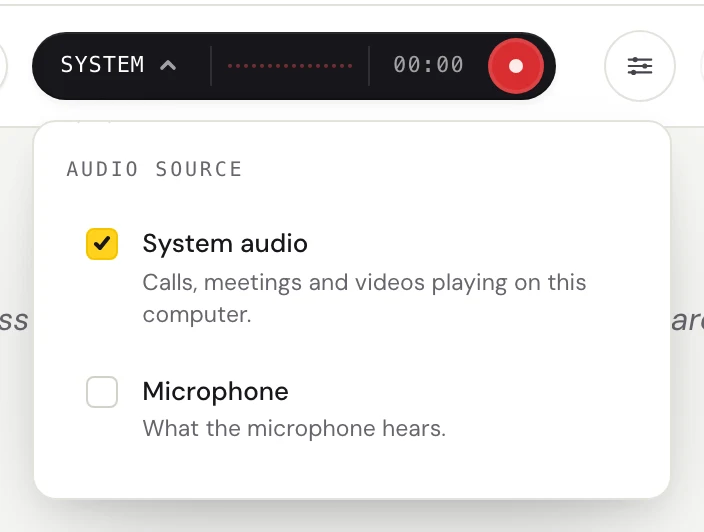
Click the dark audio pill. Check System audio for anything playing on your computer, Microphone for a person in the room, or both.
Pick the spoken language, and a translation if you want one
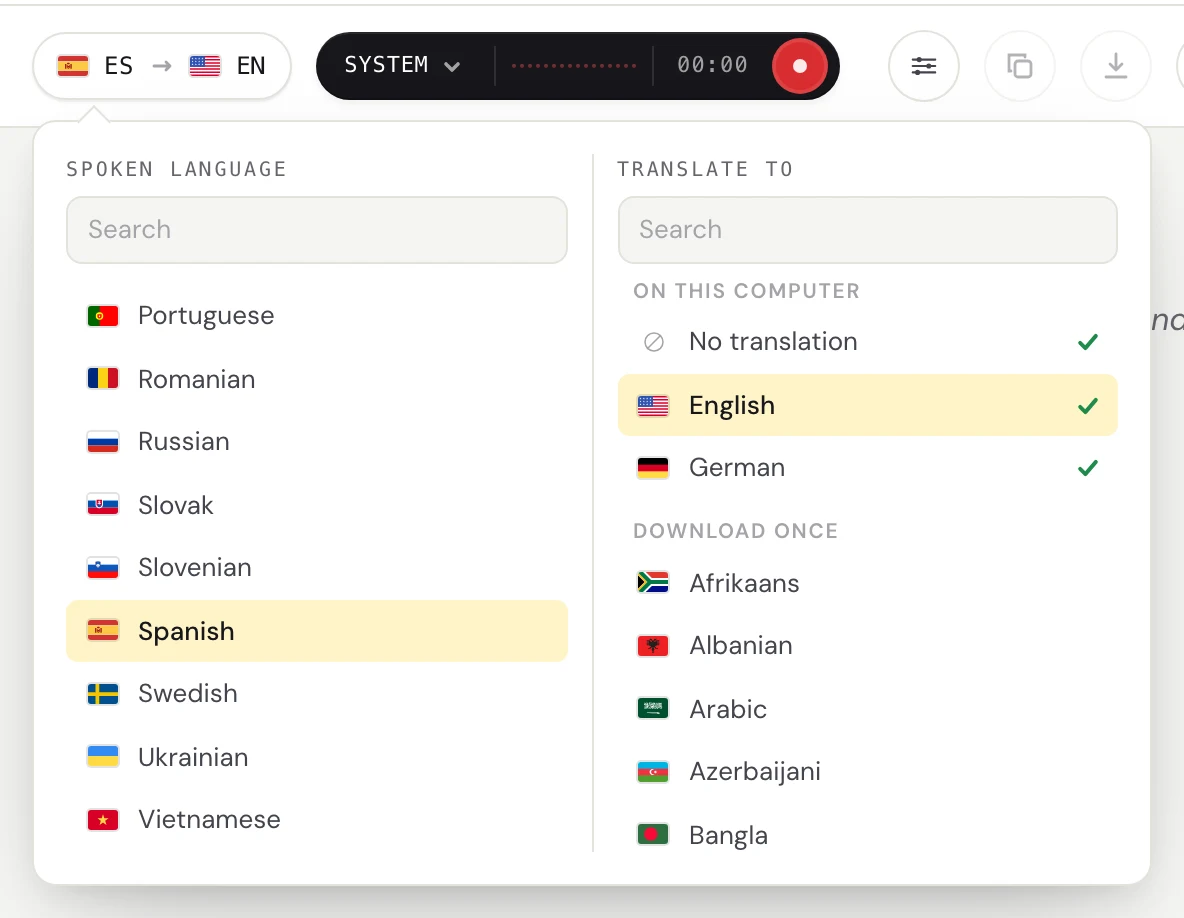
Click the language pill and set Spoken language. For subtitles in another language, set Translate to. For captions in the same language, leave it at No translation. Each language downloads once.
Start listening and open the captions window
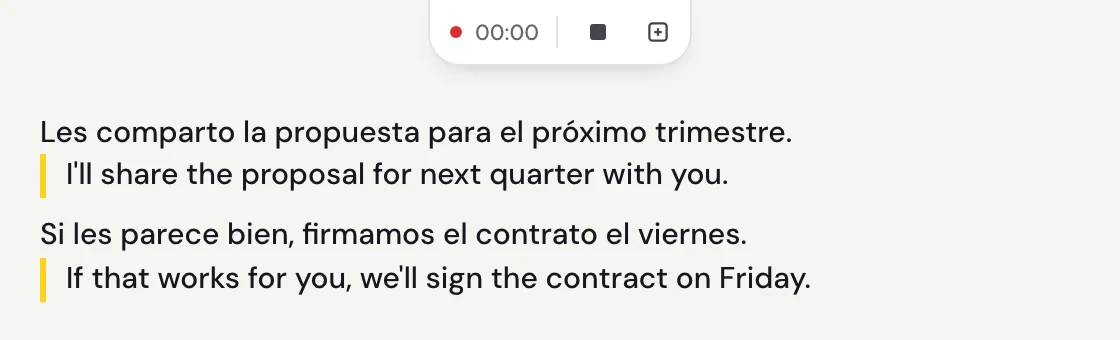
Text appears while the person talks and settles when they pause, with the translation under it. The captions window stays above your other windows, though not over an app in full screen.
It runs on macOS 14 or later on Apple silicon, and on Windows 11. The first 30 minutes are free, with no account and no card. After that it is $29.99 once or $2.99 a month, both unlimited.
Questions
What is the difference between subtitles and closed captions?
Subtitles give only the spoken words, usually as a translation, for people who can hear. Closed captions give the words in the language being spoken plus speaker names and sounds, for people who can't hear. Closed means you can turn them off.
What does CC mean?
CC stands for closed captions. Closed means they stay hidden until you turn them on, which is why the button for them is marked CC. Open captions are the opposite: they are part of the picture and always show.
What does SDH mean in subtitles?
Subtitles for the deaf and hard of hearing. SDH carries the same content as closed captions, speaker names and sounds included, as a subtitle track. Netflix's help center for production partners says people often use SDH and CC to mean the same thing.
Is open captioning the same as subtitles?
No. Open is about whether the text can be turned off, and subtitles is about what the text includes. Open captions are burned in and include sounds. Subtitles can be burned in too, but they still give only the words.
What does open caption mean at a movie theater?
The captions are shown on the big screen for everyone at that showing. AMC describes its open caption showtimes as a text display of dialogue and audio descriptions on the screen. Its closed captioning is a separate device that shows the English dialogue.
Why do I see subtitles when I turned them off?
Netflix's help page says you may see subtitles with your subtitle settings off when a show has dialogue in a language other than its original language. They cover just those lines and are often called forced subtitles.
Are closed captions required by law?
For US television, the FCC says Congress requires cable operators, broadcasters and satellite providers to close caption their programs, with some exemptions. The FCC also says it does not regulate captioning of home videos, DVDs or video games. Other places and other kinds of video have their own rules, which this page does not cover.
Can Fraze make closed captions or a subtitle file?
No. Fraze writes live captions of speech as audio plays on your computer, with a translation under each line if you choose one. It adds no speaker names or sound descriptions and makes no subtitle files. You can copy a finished session or save it as a text file, without timestamps.