The short answer
Discord has no built-in translator and no live captions for voice chat. Its accessibility settings offer text-to-speech, which reads typed messages aloud, not a transcript of what people say. The Discord translators most people find are bots and browser extensions for typed messages. The few bots that work on voice need someone with the Manage Server permission to add them, and they process the audio wherever the bot runs.
Fraze is a Mac and Windows app that listens to the Discord audio already playing on your computer and writes each line with a translation under it. Speech recognition and translation both run on your computer. No bot joins, nobody in the server has to approve anything, Fraze uploads no audio or text, and after the first language download it needs no internet.
Expect about half a second to a second of delay after someone pauses, no speaker names, and text only. It translates what you hear, for you. It does not translate your voice for the others.
What Discord and the usual translators cover
| What it works on | Who sets it up | Where the work happens | |
|---|---|---|---|
| Translator bots | Typed messages in the server | Someone with the Manage Server permission | Wherever the bot runs |
| Browser extensions | Typed messages in Discord on the web | You, in your browser | Usually an online translation service |
| Voice bots | Speech in one voice channel | Someone with the Manage Server permission | Wherever the bot runs |
| Windows 11 Live Captions | Any audio on the PC, translated only on a Copilot+ PC | You, on your own PC | Microsoft says on-device |
| Fraze | Any audio on the computer, and your microphone | You, on your own computer | On your computer |
Discord's help pages describe no translation and no captions for voice chat. People have asked for voice captions on Discord's feedback forum since at least 2020. Until that changes, voice needs something outside Discord that can hear the call.
Caption and translate a Discord voice channel
Install Fraze
Download it for a Mac with Apple silicon on macOS 14 or later, or for Windows 11. No account is needed, and nothing is added to Discord or to any server.
Choose System audio
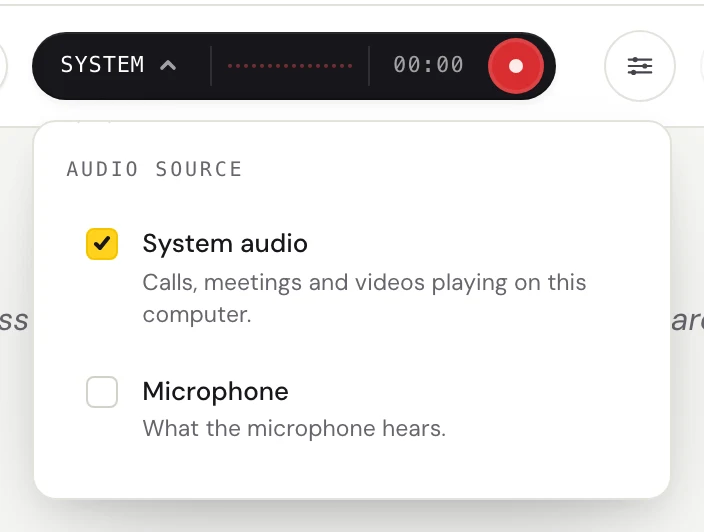
Click the dark audio pill and check System audio. That covers everyone in the voice channel, in the Discord app or in a browser. On a Mac, macOS asks once for permission. On Windows, Fraze hears the speakers or headphones Windows uses by default. If it hears other sounds but not the voices, set Output Device to Default in Discord's Voice & Video settings.
Pick the two languages
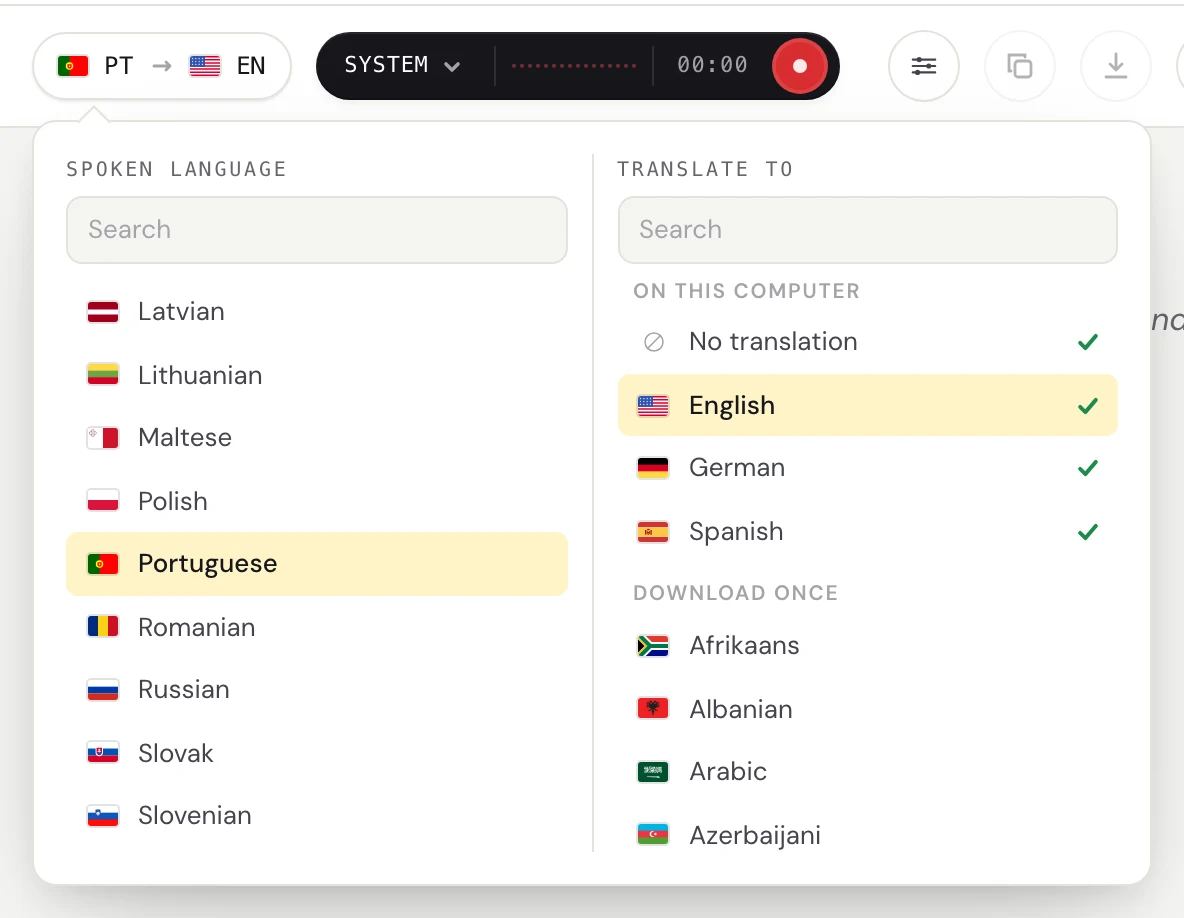
Click the language pill. Set Spoken language to the language the channel speaks and Translate to your own. The first time, Fraze downloads the two language files, and after that it needs no internet. Choose No translation if you only want captions.
Press Start listening
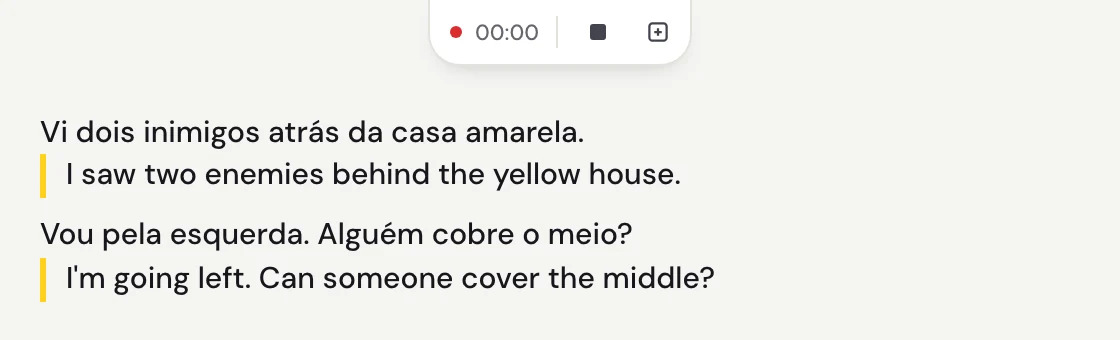
Each line appears a moment after the speaker pauses, with the translation under it. The captions button turns Fraze into a small window that stays above other windows, beside Discord or over your game. A game running in full screen can still cover it, so switch the game to windowed or borderless mode if you want the captions on top.
Your own voice, streams and Stage channels
- Discord does not play your own voice back to you, so System audio hears everyone but you. Check Microphone as well and the pill says Mix. Then your side of the conversation is in the transcript too. Headphones help, so the microphone hears you and not the call.
- A friend's Go Live stream, a Stage channel and a voice message all play through your computer, so Fraze captions them the same way.
- Finished sessions stay in History on your computer, where you can copy them or save them as text.
Why no bot, and what stays on your computer
A bot that captions or translates voice has to join the channel as a member, and someone with the Manage Server permission has to add it to the server first. In a server you do not run, that means asking. Discord also says every voice call outside Stage channels is now end-to-end encrypted. A bot in the call is one of those ends. It receives the audio like any other member, and whoever runs the bot decides what happens to it next.
Fraze works from your side of the call. It hears the voices after Discord plays them on your computer, turns them into text and translates them there, and keeps the transcript there. Nothing joins the channel, so it works in any server or DM call you are in. In some places you have to tell people before you transcribe a conversation, and some servers have rules about it, so check before you keep a transcript.
Bots do have one real advantage. A bot receives each person's audio separately, so some voice bots can put a name on each line. Fraze hears the mix your computer plays and has no speaker names.
What to expect, honestly
- There is a delay. Lines land about half a second to a second after someone pauses, so fast callouts read slightly behind.
- Voice chat is hard audio. Game sound, music, headset microphones and people talking over each other all cause mistakes, and a wrong word can become a wrong sentence after translation. Turning the game down helps. So does adding player names and game terms under Custom vocabulary in Settings.
- Lines from different people follow one another with no names on them.
- It translates from the one spoken language you pick. In a channel that switches between languages, lines in the other language may come out wrong.
- It hears 25 European languages on Mac and Windows, including Spanish, Portuguese, French, German, Polish, Russian and Ukrainian. It also hears Chinese, Japanese, Korean, Cantonese, Vietnamese and Thai on Mac and Windows. It does not hear Turkish, Arabic or Hindi, for example. Translation covers about 50 languages to or from English.
- It is text only. It does not speak translations aloud, translate typed messages, or show anything on the other people's screens.
- It needs macOS 14 or later on Apple silicon, or Windows 11 on x64 with a 4-core AVX2 processor and 8 GB of memory. There is no phone or console app.
When you do not need Fraze
- You only need typed messages translated. A translator bot or a browser extension does that, and several have free plans.
- Everyone speaks your language and you only need captions. Windows 11 Live Captions are free. Press the Windows key, Ctrl and L. A Mac with Apple silicon has Live Captions under Accessibility in System Settings, in fewer languages.
- You want the others to hear your voice in their language. Fraze does not do that.
What it costs
The first 30 minutes are free, with no account and no card. After that it is $29.99 once or $2.99 a month, both unlimited. Because the work happens on your computer, there is no per-minute charge, so a four-hour raid night costs the same as one quick match.
Questions
Does Discord have a built-in translator?
No. Discord's help pages describe no translation for messages or voice chat, and no live captions. Its accessibility settings include text-to-speech, which reads typed messages aloud. For typed messages, people add a translator bot or a browser extension.
Can a Discord translator bot translate voice chat?
The common ones cannot. They translate typed messages. A few bots join voice channels and transcribe or translate speech. Someone with the Manage Server permission has to add them, and they process the audio wherever the bot runs. Fraze needs no bot, because it listens on your own computer.
Can I use Google Translate for Discord voice chat?
Not on the computer. Google's help page says you can't talk and translate at the same time on Google Translate for the web. Some people hold a phone with the Google Translate app near their speakers, which works for a few sentences, but you end up reading a small screen beside a big one.
Does anything join the voice channel?
No. Fraze is an app on your computer that listens to sound your computer is already playing. There is no bot in the member list and nothing for the server owner to approve. In some places you have to tell people before you transcribe a conversation, so check what applies to you.
Can it translate my voice for my teammates?
No. Fraze shows you a translation of what you hear, on your own screen. It does not speak and it does not change what the others hear. With Mix it captions your own voice too, for your own transcript.
Does it work offline?
Yes, after the first download of the two language files. Discord itself still needs the internet, but the captions and the translation do not.
Does it work with Discord on a phone?
No. Fraze is a desktop app for macOS and Windows 11. It works with the Discord desktop app and with Discord in a browser.