The short answer
Wordly is an online service that organizers buy to translate a meeting or an event for everyone in it. The speaker's audio goes into Wordly, and attendees scan a QR code or open a link on their own phone, tablet or computer, pick a language, and read live captions or listen to an AI voice. Its languages page lists 61 languages a presenter can speak and 67 that attendees can choose, counting variants such as US and UK English.
Wordly's pricing page says pricing starts at about $1,500 for a 10-hour package, used over up to 12 months. Larger packages are quoted. Attendees do not pay and need no account, but they can only join a session that an organizer has set up and paid for.
Fraze is for one person at their own computer. It listens to whatever the computer plays, or to the microphone, and shows each line with a translation under it. Both steps run on the computer, so no audio or text is uploaded, and it works with no internet once a language is downloaded. If you are running an event for an audience, Wordly is built for that job and Fraze is not.
What Wordly does
- Live captions and translation for in-person, virtual and hybrid events. Wordly says it works with Zoom, Teams, Google Meet, Webex and event platforms such as Cvent.
- Attendees join in a browser by QR code or link, with no account and no download. A free iPhone and Android app adds translated audio that keeps playing with the screen locked.
- Each attendee picks a language and reads, listens to an AI voice, or both. Wordly's FAQ says the audio plays after each sentence is finished.
- Presenters can speak different languages in one session, and Wordly says it can detect the change and switch on its own.
- Glossaries for names and jargon, and a transcript after every session. Summaries, translated transcripts and audio files for dubbing come with the larger packages.
- Captions on screens in the room, an embed for event platforms, and on-site support for an extra fee.
The organizer sets it up. They create a session in the Wordly Portal, connect the room's sound system or the online meeting, and share the session code. Wordly's FAQ says one session can hold tens of thousands of attendees, and that Wordly is all AI, with no human interpreters.
Wordly pricing at the time of checking
Wordly's pricing page says pricing starts at about $1,500 for a 10-hour package, which can be used in any increment for up to 12 months. That is about $150 an hour of session time on the smallest package. It charges for the minutes used, without rounding up, and every language is included in the one price. The table lists packages of 10, 25, 50, 100, 250 and 500 or more hours a year. The page shows no price for the larger ones. Its FAQ says to contact Wordly for a proposal, and that the price depends on session hours and the number of attendees.
Every package in the table includes audio and caption output, session transcripts, glossaries and integrations. Summaries, translated transcripts and audio files for dubbing start at the 50-hour package, and single sign-on and configurable data storage at 500 hours. Wordly lists volume discounts of 10 to 30 percent or more, multi-year discounts, and an extra 10 percent off for nonprofits, NGOs and education from the 25-hour package up. The page says unused hours can roll over at the end of the term, and to ask a sales rep about it.
Wordly suggests buying online by card for smaller purchases, and through sales for larger ones, invoices or nonprofit discounts. It compares its price with hiring human interpreters and says it saves up to 90 percent. For one person who wants to follow one talk, the comparison is a different one: Fraze is $29.99 once or $2.99 a month after 30 free minutes. Prices change, so check Wordly's page before you buy.
Who pays, and who can use it
Wordly is bought by whoever runs the event: a conference, a company town hall, a city council, a school, a church. Attendees do not pay. Its app page says the app is free for attendees, but that the meeting organizer or host needs a Wordly account. So if the conference you are watching, or the service you are sitting in, does not offer Wordly, there is no session for you to join.
If it does offer Wordly, use it. It costs you nothing and it was set up for that room. Fraze is for the other cases: an event with no translation, a stream from another country, or a talk you would rather read on your own computer with nothing sent anywhere.
Where the work happens
Wordly is an online service. Its languages page says all of the transcription and translation is done by the Wordly platform in real time, and its FAQ says attendees need a phone, tablet or computer with internet access. Its security page says it runs on Amazon Web Services and Google Cloud, encrypts data in transit and at rest, and is committed to keeping customer data from being used to train speech recognition and translation models. It lists independent security audits and certifications, with reports on request through its trust center. Its privacy policy says Wordly does not share data with third parties, and that the personal information it collects is stored on a server in the United States.
Fraze is built the other way round. Turning speech into text and translating it both run on your computer. After the first download of the language files it works with Wi-Fi off, and no audio or transcript text is uploaded. Finished sessions stay in History on that computer, where you can copy them, save them as a text file, or delete them.
If you caption a private meeting rather than a public talk, some places require you to tell the other people first, whichever tool you use.
Wordly and Fraze side by side
| Made for | What people get | Where it runs | Price when checked | |
|---|---|---|---|---|
| Wordly | An organizer serving a whole audience | Captions and an AI voice, in many languages at once, on each attendee's device | Online, on Wordly's platform | From about $1,500 for 10 hours, larger packages quoted |
| Fraze | One person at their own computer | Text captions with one translation, on that computer | On your computer | 30 free minutes, then $29.99 once or $2.99 a month |
The languages differ too. Fraze hears 25 European languages plus Chinese, Japanese, Korean, Cantonese, Vietnamese and Thai on Mac and Windows. It translates about 50 languages to or from English, and other pairs go through English. Wordly's presenter list is longer and includes Arabic, Hindi and Turkish, which Fraze does not hear.
When Wordly is the better pick
- You run the event and want every attendee to follow in their own language, many languages at once.
- People need to hear the translation. Wordly has an AI voice. Fraze shows text only.
- The speaker uses a language Fraze does not hear, such as Arabic, Hindi or Turkish.
- Speakers switch languages during the session. Wordly says it can follow the switch. In Fraze you pick one spoken language.
- You need transcripts, translated transcripts, summaries or subtitle files after the event.
- You need captions on a screen in the room or built into your event platform.
When Fraze is the better pick
- The event offers no translation and you want to follow it anyway. Fraze needs nothing from the organizer.
- You are one person, not an audience. Fraze has no hours to count, so a three-day conference costs the same as one talk.
- The words should not leave the machine: an internal briefing, a confidential meeting, a sensitive subject.
- You are on a plane or a poor connection. After the first language download, Fraze works offline.
- You want it for calls, classes and videos too, not only for events.
The first 30 minutes are free, with no account and no card. After that it is $29.99 once or $2.99 a month, both unlimited.
Follow a talk in another language with Fraze
Install Fraze
Download it for a Mac with Apple silicon on macOS 14 or later, or for Windows 11. No account is needed.
Choose what it listens to
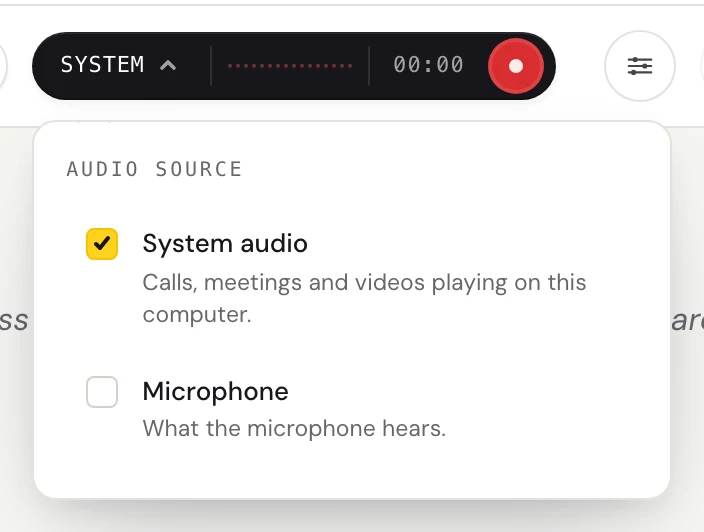
Click the dark audio pill. Check System audio for a livestream, a webinar, or a Zoom or Teams event playing on your computer. In the hall itself, check Microphone instead, and sit where you can hear the speaker clearly.
Pick the two languages
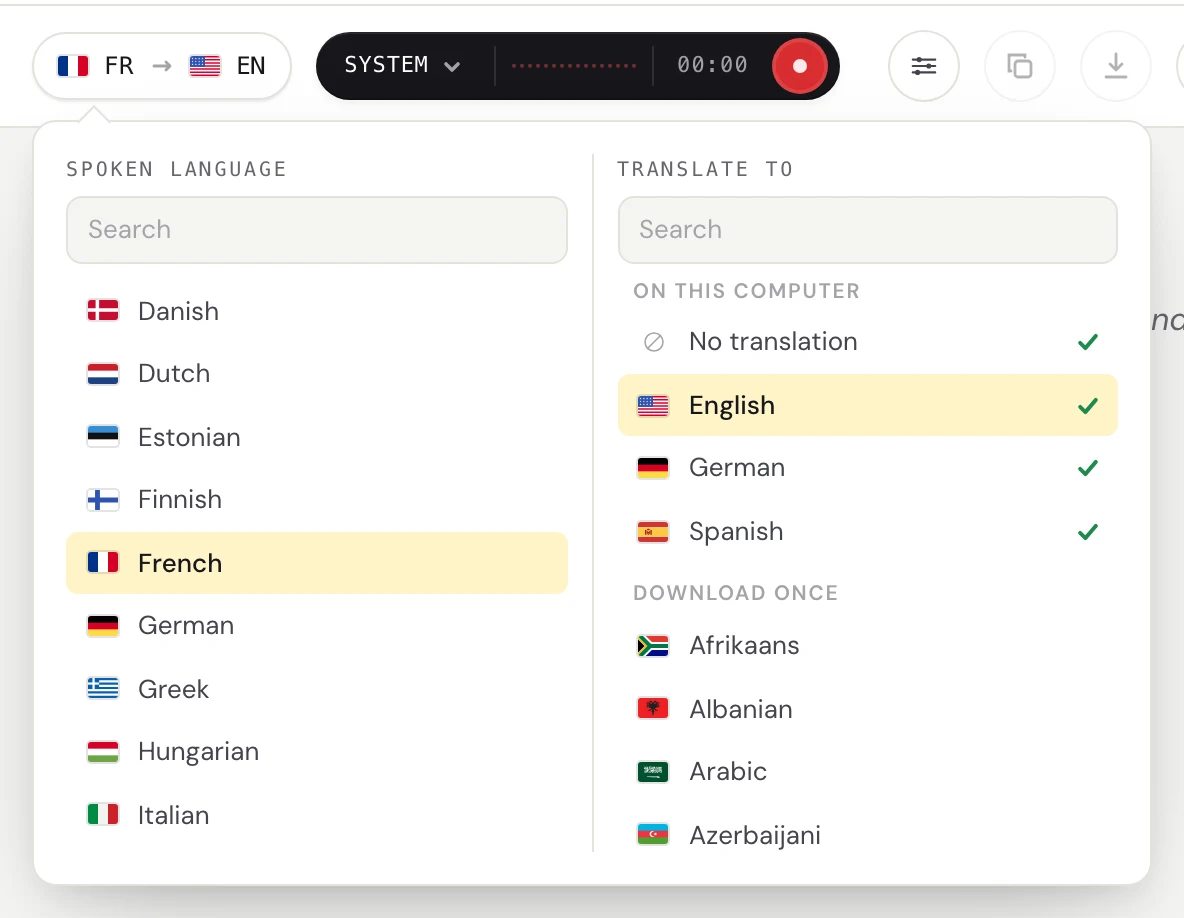
Click the language pill. Set Spoken language to the speaker's language, French in this example, and Translate to English. The first time, Fraze downloads the two language files, and after that it needs no internet.
Press record and open the captions window
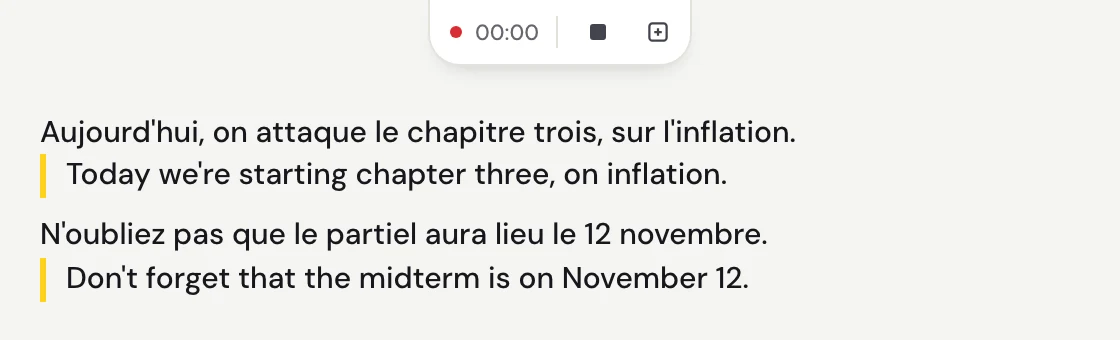
The French appears while the speaker talks. The English under it can change as the sentence goes on, and settles when they pause. The captions button turns Fraze into a small window that stays above the stream.
Questions
What is Wordly AI?
An online service for live translation and captions at meetings and events. The organizer feeds the speaker's audio into Wordly, and attendees follow on their own phone, tablet or computer by QR code or link, reading captions or listening to an AI voice in the language they pick. Organizers also get a transcript of each session, and summaries on the larger packages.
How much does Wordly cost?
Wordly's pricing page says pricing starts at about $1,500 for a 10-hour package, used over up to 12 months, and larger packages are quoted by sales. It lists volume, multi-year, nonprofit and education discounts. Attendees do not pay.
Is Wordly free?
For attendees, yes. They join in a browser or the free app. Organizers pay for hours. Wordly offers an online demo, and its FAQ says you can ask a sales rep about a trial. Fraze's first 30 minutes are free on each computer, with no account and no card.
How does Wordly work?
The organizer creates a session in the Wordly Portal and connects the speaker's audio, from the room's sound system or from an online meeting such as Zoom or Teams. Attendees scan a QR code or open a link, pick a language, and read or listen. After the session, the organizer can download the transcript.
Is there a Wordly alternative for one person?
Wordly is bought by organizers, and its app page says the organizer or host needs a Wordly account before attendees can use it. Fraze is made for one person. It captions and translates whatever your Mac or Windows PC plays, or its microphone, on that computer, with no organizer involved. It shows text only and hears fewer languages.
Does Wordly work offline?
Wordly's FAQ says attendees need a device with internet access, and its languages page says the transcription and translation are done by the Wordly platform. Fraze runs both steps on your computer and works with Wi-Fi off after the first language download.