The short answer
An AI interpreter listens to speech, turns it into text, translates it, and then speaks the translation or shows it on a screen. Which one you need depends on where the conversation happens and who has to understand whom. Face to face, a phone app or translation earbuds handle both sides out loud. At a conference, an event platform puts the translation on every attendee's phone. On a call on your computer, an app can show the other person's words in your language as text.
Fraze is that last kind. It is a Mac and Windows app that listens to a call, a video or the room and writes each line with a translation under it. It does not speak, and it translates one direction at a time. Speech recognition and translation both run on your computer, so no audio or text is uploaded, and it works offline once a language is downloaded.
For court, the US National Center for State Courts says AI should not replace human interpreters for spoken interpretation in proceedings. For a medical, legal or official conversation, ask the organization involved how it provides interpreters.
Which kind of AI interpreter do you need?
| Good for | Both directions | Speaks the translation | What it takes | |
|---|---|---|---|---|
| Phone app, such as Google Translate | Two people in the same room | Yes, it switches between the two languages | Yes, or text only | A phone. Free |
| Translation earbuds, such as AirPods or Timekettle | Hands-free talk, travel | Yes, your replies play from the phone | Yes, in your ear | Supported earbuds and phone |
| Meeting or event platform, such as Zoom, Teams or Wordly | Webinars, conferences, company meetings | Yes, for everyone in the meeting | Some do, some show captions | The organizer sets it up and pays |
| Interpreting service, such as LanguageLine or Boostlingo | Hospitals, clinics, public services | Yes | Yes | Bought by the organization, with human interpreters on call |
| Human interpreter | Court, medical care, other high-stakes talks | Yes | Yes | Booking a person, often through the organization |
| Fraze | Following a call, a video or a talk on your computer | No, one language pair at a time | No, text only | A Mac or a Windows 11 PC. Nothing uploaded |
Google Translate's live translate mode listens for two languages, plays each translation out loud, and can show the conversation split across the screen so each person reads their own half. Google lists more than 70 languages for it. It works offline only on Pixel 9, 10 and 11 phones, and only for the pairs Google lists.
Apple's Live Translation with AirPods translates what the other person says into your ear. Apple says it needs supported AirPods, an iPhone 15 Pro or later with Apple Intelligence turned on, and iOS 26 or later, and that once the languages are downloaded everything is processed on the iPhone. The other person reads your reply on the iPhone screen or hears it from the speaker. Timekettle's W4 Pro earbuds, $449 on Timekettle's site at the time of checking, translate both sides of a conversation, and Timekettle lists phone calls and online meetings among their modes.
The organizer buys an event platform, not you. Wordly says attendees open the translation from a QR code or a link on their own phone and choose to read or listen, and its price depends on the hours bought. Zoom and Teams have their own translated captions on some plans, covered in the guides linked below.
If you need your own voice translated into a call on your computer, some desktop apps speak the translation aloud. The comparison of on-device translation apps, linked at the foot of this page, covers them.
When you still need a human interpreter
- Court. The US National Center for State Courts says AI should not be used to replace human interpreters for real-time spoken interpretation in court proceedings, because of the risks around context, nuance and errors.
- Health care. Boostlingo, which sells AI interpreting to health care organizations, describes AI for routine scheduling and check-ins and says human interpreters lead high-stakes clinical conversations. LanguageLine runs a pilot of AI interpreting for routine, low-risk calls, with certified interpreters to take over, and gives a mental health check as a case for a human interpreter only.
- Apple adds its own warning. Its Live Translation page says outputs may be inaccurate and asks you to check important information for accuracy.
- If you are a patient, a party to a case, or dealing with a school or a government office, ask that organization how it provides interpreters before you rely on an app. Fraze is not built for these conversations either.
Where text on your screen is enough
- You speak some of the language but lose the thread when people talk fast, like a landlord explaining a repair.
- The other side understands English but explains things best in their own language, like a supplier walking through an order.
- You mostly listen. A webinar, a lecture, a church service, a parent evening on Zoom, an all-hands in another language.
- You are a guest on someone else's call, so you cannot add a bot or change the meeting settings.
- The conversation is private and you would rather it did not go to a server.
A spoken interpreter carries both sides. Text on your screen helps one person follow the other. That is less than a full interpreter, but it covers a lot of real calls:
Follow a call in another language with Fraze
Install Fraze
Download it for a Mac with Apple silicon on macOS 14 or later, or for Windows 11. No account is needed.
Choose what it listens to
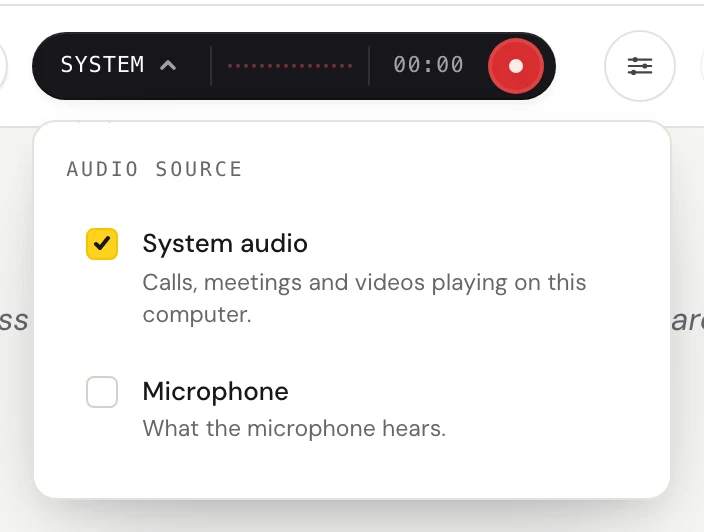
Click the dark audio pill. On a call, check System audio only, so Fraze hears the other person and not you. Check Microphone instead when the person is in the room with you.
Pick the two languages
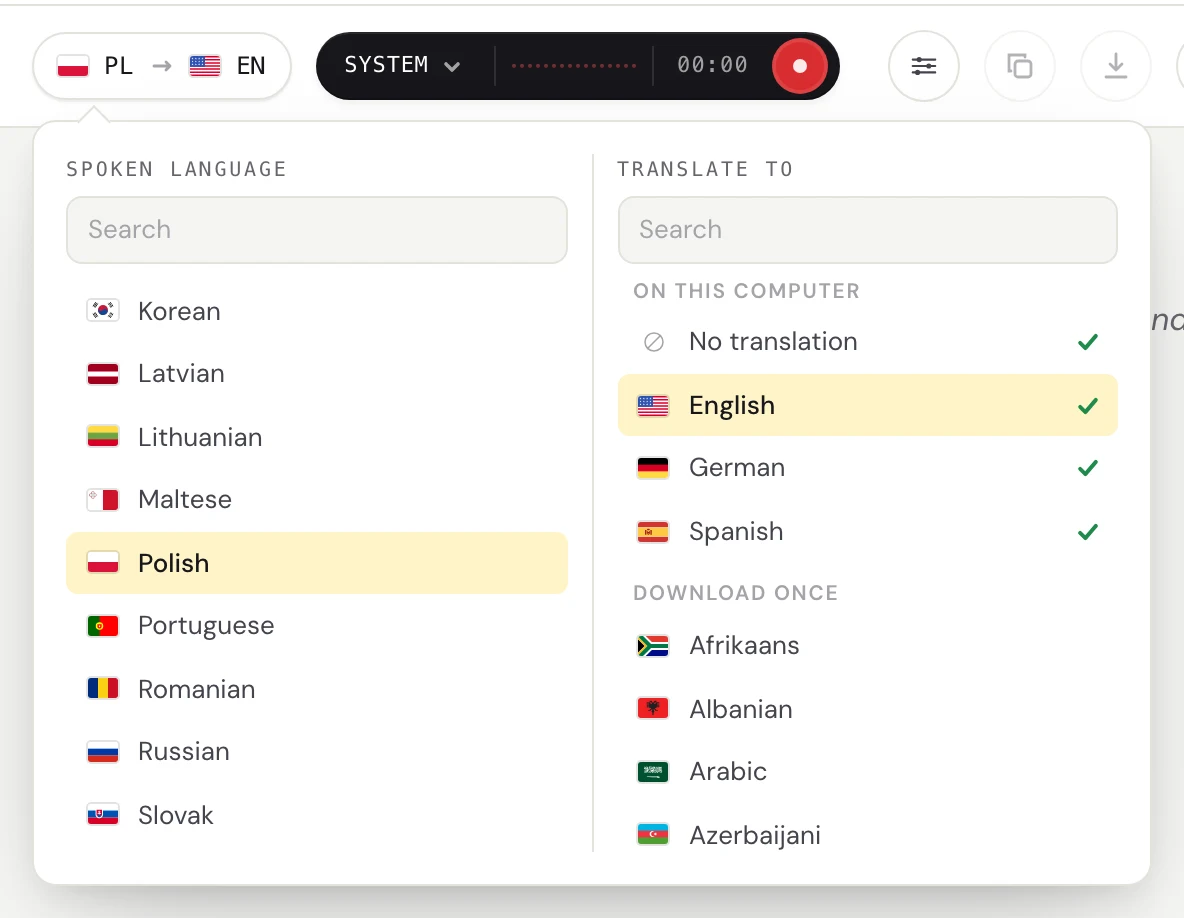
Click the language pill. Set Spoken language to the other person's language, Polish for example. Under Translate to, pick the language you read. The first time, Fraze downloads the language files, and after that it needs no internet.
Press Start listening
Words appear while the other person talks, and the translation settles a moment after they pause. The captions button opens a small window that stays above the call, so you can read without switching apps.

Answer in a language they know
Fraze does not translate what you say. Reply in English if they understand it, or keep a phone translation app open for your side. When you stop listening, the session is saved in History, where you can copy it or save it as a text file.
What to expect, honestly
- One direction at a time. Fraze follows the language you picked as spoken, so it gives you their side of the conversation, not yours.
- Text only. It does not speak the translation, in your ear or out loud.
- A short delay. The translation can change while the person is still talking and settles when they pause.
- Machine translation makes mistakes. Names, numbers, slang and people talking over each other are where it slips. There are no speaker labels.
- It hears 25 European languages on Mac and Windows, among them Polish, Ukrainian, Italian, Dutch, Spanish and French. It also hears Chinese, Japanese, Korean, Cantonese, Vietnamese and Thai on Mac and Windows. It does not hear Hindi or Arabic, for example.
- It needs macOS 14 or later on Apple silicon, or Windows 11 on x64 with a 4-core AVX2 processor and 8 GB of memory. There is no phone app.
Why it runs on your computer
A call with a landlord, a supplier or your child's school is not something everyone wants sent to a server. Fraze turns the speech into text and translates it on your computer. No audio or text is uploaded, Fraze never saves the audio, no bot joins the call, and the other side installs nothing.
Once the two language files are downloaded, it also works on a plane or with Wi-Fi switched off.
What it costs
The first 30 minutes are free, with no account and no card. After that it is $29.99 once or $2.99 a month, both unlimited. The work happens on your computer, so there is no per-minute charge and a two-hour call costs the same as a short one.
Questions
What is an AI interpreter?
Software that listens to speech in one language and gives it back in another while people talk, either spoken aloud or as text. It does up to three jobs in a row: speech to text, translation, and for the spoken kind, text back to speech.
Is there a free AI interpreter?
Yes. Google Translate's live translate mode on a phone is free and handles a back-and-forth conversation out loud. Fraze gives the first 30 minutes free, with no account or card, then costs $29.99 once or $2.99 a month.
Can an AI interpreter replace a human interpreter?
Not in court, according to the US National Center for State Courts. It says AI should not replace human interpreters for spoken interpretation in court proceedings. Boostlingo, which sells AI interpreting to health care organizations, lets staff hand a conversation to a human interpreter when it needs clinical nuance. For a medical, legal or official conversation, ask the organization involved how it provides interpreters.
Is there an AI interpreter for Zoom or Teams meetings?
Both translate captions on certain plans, and Zoom's Voice Translator and the Teams Interpreter agent speak the translation. The guides linked below go through what each needs. Fraze works beside any meeting app without the host changing a setting, as text on your own screen.
Can Fraze translate both sides of a conversation?
No. It handles one language pair at a time, the other person's language into yours. What you say is not translated for them, so pair it with a phone app or a shared language for your replies.
Does Fraze speak the translation?
No. It shows text. For a spoken translation face to face, use a phone app such as Google Translate or translation earbuds.
Does it work offline?
Yes, after the first download of the two language files. Speech recognition and translation both run on your computer, and no audio or text leaves it.